
You are using an out of date browser. It may not display this or other websites correctly.
You should upgrade or use an alternative browser.
You should upgrade or use an alternative browser.
What do you use to write with?
- Thread starter OmegaC
- Start date


Worthy39
The protagonist's third cousin, twice removed
- Joined
- Aug 6, 2025
- Messages
- 683
- Points
- 93
But yours are so much better!Use your own thumbs!

A-Random-Writer
Humanity's strongest soldier.
- Joined
- Jan 5, 2026
- Messages
- 164
- Points
- 63
Google docs and my own hands.
Last edited:

DarkCrinkle
Member
- Joined
- Apr 1, 2026
- Messages
- 37
- Points
- 18
How vanillaAny inconveniences with that?
Very inconvenient when it comes to checking spelling mistakes or grammar. But its convenient enough to be just there without a need to download a separate program, and simple.I am just lazy to transfer my shz from a different program at this point.

NapLovingImmortal
Lord Napper
- Joined
- Dec 5, 2025
- Messages
- 91
- Points
- 33
Be carefull with Obsidian! I lost all my previous stuff! Back it up somewhere!

OmegaC
Member
- Joined
- Apr 25, 2025
- Messages
- 32
- Points
- 18
Yeah, I've mentioned this earlier.Be carefull with Obsidian! I lost all my previous stuff! Back it up somewhere!
Edit: And I use FolderSync to back up everything to Google Drive, since my laptop is like 80 years old

Last edited:

SouthernMaiden
✨🏳️⚧️yippee!🏳️⚧️✨
- Joined
- Nov 11, 2025
- Messages
- 346
- Points
- 93


NotaNuffian
This does spark joy.
- Joined
- Nov 26, 2019
- Messages
- 5,335
- Points
- 233
Gdocs for convenience.
But I use Obsidian to make a mindmap that I don't really follow and use.
But I use Obsidian to make a mindmap that I don't really follow and use.

expentio
Well-known member
- Joined
- May 8, 2019
- Messages
- 360
- Points
- 103
I use Wordpad on an almost breaking apart acer tablet that still has Windows 8, because they never again got a better display keyboard together.
It's held together by some straps of plastic and my hopes, and once it breaks apart, I'm gonna cry.
It's held together by some straps of plastic and my hopes, and once it breaks apart, I'm gonna cry.

DeOwl
Well-known member
- Joined
- Mar 13, 2024
- Messages
- 43
- Points
- 58
Scrivener because... I don't know why really.
But I refuse to use microslop, and having to manually manage files gets annoying, so no onlyOffice, etc.
I can't use markdown for my current strory because I have tables with merged columns, which markdown cannot do (as far as I know), so no markdown based apps.
I can not use online services because I am a paranoid Linux user with a homeserver, so that's out too.
And now, all that is left is... scrivener, and a few scrivener alternatives (like novelwriter if I remember correctly) that I cannot migrate to because scrivener export functions suck
And I don't hate myself enough to use latex
But I refuse to use microslop, and having to manually manage files gets annoying, so no onlyOffice, etc.
I can't use markdown for my current strory because I have tables with merged columns, which markdown cannot do (as far as I know), so no markdown based apps.
I can not use online services because I am a paranoid Linux user with a homeserver, so that's out too.
And now, all that is left is... scrivener, and a few scrivener alternatives (like novelwriter if I remember correctly) that I cannot migrate to because scrivener export functions suck
And I don't hate myself enough to use latex
Last edited:

Representing_Tromba
Sleep deprived mess of an author begging for feedb
- Joined
- Jan 29, 2020
- Messages
- 6,012
- Points
- 233
Atticus and Google docs.


Lysander_Works
Well-known member
- Joined
- Jul 22, 2023
- Messages
- 698
- Points
- 133
Ink and Quill.
Some messenger owls are used for editing suggestions.
Some messenger owls are used for editing suggestions.


ConansWitchBaby
Da Scalie Whisperer
- Joined
- Dec 23, 2020
- Messages
- 1,746
- Points
- 153
Have you tried Manuskript? It's open source. For merged columns, unfortunately the only way is to write it in html.Scrivener because... I don't know why really.
But I refuse to use microslop, and having to manually manage files gets annoying, so no onlyOffice, etc.
I can't use markdown for my current strory because I have tables with merged columns, which markdown cannot do (as far as I know), so no markdown based apps.
I can not use online services because I am a paranoid Linux user with a homeserver, so that's out too.
And now, all that is left is... scrivener, and a few scrivener alternatives (like novelwriter if I remember correctly) that I cannot migrate to because scrivener export functions suck
And I don't hate myself enough to use latex
I'm now using Jarte. The paid version went free years ago. It's Word without the bullshit.
OmegaC
Member
- Joined
- Apr 25, 2025
- Messages
- 32
- Points
- 18
You can embed HTML into markdown files, you know...Scrivener because... I don't know why really.
But I refuse to use microslop, and having to manually manage files gets annoying, so no onlyOffice, etc.
I can't use markdown for my current strory because I have tables with merged columns, which markdown cannot do (as far as I know), so no markdown based apps.
I can not use online services because I am a paranoid Linux user with a homeserver, so that's out too.
And now, all that is left is... scrivener, and a few scrivener alternatives (like novelwriter if I remember correctly) that I cannot migrate to because scrivener export functions suck
And I don't hate myself enough to use latex
For example, in Obsidian:
Last edited:
DeOwl
Well-known member
- Joined
- Mar 13, 2024
- Messages
- 43
- Points
- 58
Thanks, I do remember reading that it is possible to get merged tables, but that feels kinda janky...
Markdown is good, don't get me wrong, I use it all the time in university and for documentation, but I have tried markdown-based novel writing software (manuskript and obsidian and I think something else I don't remember the name of), but I don't enjoy using tags for writing because it makes it difficult for me to immediately understand what I have to do to change something and it is slightly more intrusive during reading than ms-word like editors. and I think html tables would make that even worse.
Plus there is the question of how well html tables paste into scribblehub, which I do not know (maybe they paste perfectly well)


CountVanBadger
Inventor of the you-know-what
- Joined
- Nov 5, 2025
- Messages
- 444
- Points
- 93
I use google docs so I can access it no matter where I am. When I was younger, though, I used one of these:
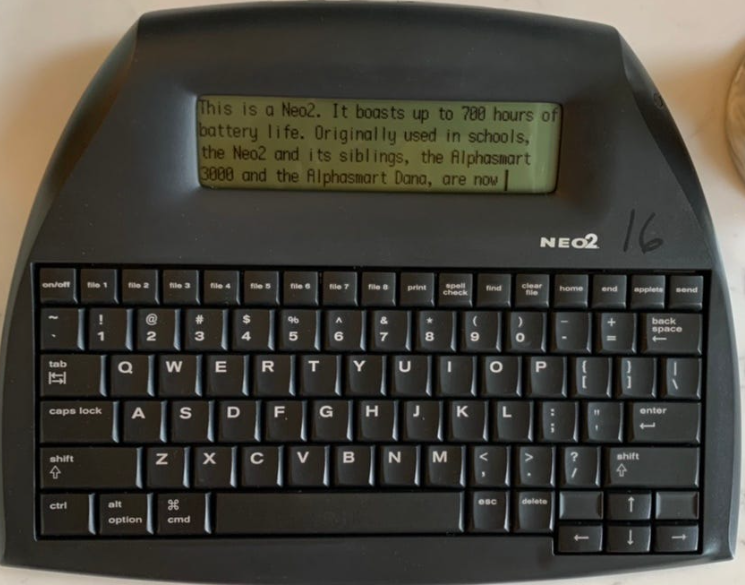
It was really handy back when I didn't have 24/7 internet access. You can buy them for, like, $30 on ebay, and a few AA batteries will keep it running for 700 hours. It has a built in spell check and thesaurus. It lets you have eight files open simultaneously, but you can save others in the background, and it can hold roughly 200 pages of text. Then when you're ready, you just connect it to your computer and transfer it all over. The only reason I stopped using it was because formatting didn't carry over, so if I wanted to italicize any words (and I italicize a lot of words) I'd have to go back over the doc after transferring it to re-italicize everything. Also, like I said, now that I have internet access pretty much everywhere I go, it's easier to just use google docs and not have to transfer it onto my computer.
It was really handy back when I didn't have 24/7 internet access. You can buy them for, like, $30 on ebay, and a few AA batteries will keep it running for 700 hours. It has a built in spell check and thesaurus. It lets you have eight files open simultaneously, but you can save others in the background, and it can hold roughly 200 pages of text. Then when you're ready, you just connect it to your computer and transfer it all over. The only reason I stopped using it was because formatting didn't carry over, so if I wanted to italicize any words (and I italicize a lot of words) I'd have to go back over the doc after transferring it to re-italicize everything. Also, like I said, now that I have internet access pretty much everywhere I go, it's easier to just use google docs and not have to transfer it onto my computer.