Seeking Brutally Honest, No-Holds-Barred Feedback on My Book Cover

Daeron

Kin-Slayer
Joined
Jan 22, 2026
Messages
97
Points
33
The first thing I see is the shield...
However, it's Litrpg right, you need to bring the screen more vibrant or equal as the shield.
The screen is almost being missed by me.
View attachment 45986
As you can see, the screen's value is almost the same as the background, so it's hard to catch.
If you want to bold, make that spear thrust the screen and give a glitch effect. I saw the screen 1 or 2 metres from her face, because the spear is in front of the screen. You can move that screen in front of the spear layer, or maybe touch the spear and give a glitch effect, it will make more focus on the screen.

I can give you more about the pose.
View attachment 45987
It's still stiff. The pose isn't showing the real frightened scared, or bravery, it's just stand up. You can adjust with the countrapose of what I drew in red, tilt the red on the head up to see the monster, tilt down the shoulder, and tilt up the hips. It will be more powerful.

Lastly, bring to the shield more right.
View attachment 45988


If you want more brutal honesty.
The character design needs to be adjusted; there is no appeal in her. If you put down the spear and the shield, there isn't anything that identifies the character. You need to add an object or a symbol of a character. For example, what is the character's profession? This will make the character known not with a spear and shield, but in the character.

Does the cover match a dark, gritty LitRPG/dystopian tone?
Tone down the value of the art. Now your value isn't dark. Tone down the yellow or orange, or maybe change the color, spirit, and bravery color varies depending on the character.
View attachment 45989
Right now, your shield isn't showing a dark or gritty
However, if you want to make the shield become a symbol, you need to make it appear more vibrant than surround it. Tone down the surrounding area.
What is the appeal on that cover? The color of red in the dark.
Give your reader a point of interest.

View attachment 45993

Right now, your cover isn't showing dark and gritty in that point.
However, your cover is showing survival spirit.
Well damn, this is very detailed and good advice.
 

S.T.Collier

Active member
Joined
Oct 8, 2023
Messages
9
Points
43
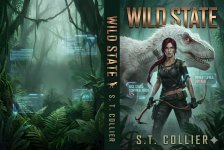
Hello there, everyone. I've read your replies, all good points that i taken onboard and created the cover to better fit my story's tone and subject.

Attached is the current wip of adapting all your points to improve my cover.

Thanks for the input you all have given me.

S. T. Coliier
 

Attachments

  • WIP Ebook cover.jpg
    WIP Ebook cover.jpg
    354.9 KB · Views: 15

Daeron

Kin-Slayer
Joined
Jan 22, 2026
Messages
97
Points
33
Hello there, everyone. I've read your replies, all good points that i taken onboard and created the cover to better fit my story's tone and subject.

Attached is the current wip of adapting all your points to improve my cover.

Thanks for the input you all have given me.

S. T. Coliier
This is just my opinion, But the first one looks better than this one.
 

L1aei

Well-known member
Joined
Jun 19, 2025
Messages
1,047
Points
113
This is just my opinion, But the first one looks better than this one.

Not gonna bang on this, just going to say that for others it'll help catch the eye; especially mine. :sweat_smile:
 

TinaMigarlo

the jury is back. I'm almost too hot for smuthub.
Joined
Jan 9, 2026
Messages
511
Points
93
I wanted to pull her ponytail in the first one, if you know what I mean.
lol
 

8128

New member
Joined
Jan 16, 2026
Messages
9
Points
3
Something about the composition is bothering me, the framing of the shot, the dinosaur is way too close and her posture is very relaxed about it. It's basically in biting range and she is "just standing there". I would imagine an experienced warrior (seems like she is fully kitted out) would be hunched down spear forward, shield out, ready to jump/strike/dash/thrust, etc. Since the art is gorgeous, I only wanted to highlight the framing and how natural the scene looks to me. In my eyes the dino would have to be way further back or even prowling where the MC hasnt seen them yet, to be that relaxed in posture about it. Also something about her stance is unsettling on another note, her right leg does not seem "connected" to her spine, something there structurally is off a bit as well.
Otherwise is amazing, great job on the graphics! Loving it
 

yakusu

Well-known member
Joined
Feb 26, 2023
Messages
26
Points
68
Same with my feedback... Weak pose, and weak value.
The composition is still not aligned. The tone is still too messy, too much red.
Now, the style is more like gore, not dark, gritty.

I know you use an AI. However, you can try to cheat it. First, you generate the character with a great pose, after that you generate the monster, and last you generate the environment. After that, you put each into one piece. It's called manipulation art.
Here, the references

You can't just generate one image; you need to generate countless images, and each thing isn't in one frame. Called it done, you need to adjust the tone, the point of interest, etc.

The new one has a better grid rule for the composition, but still nothing exciting in the cover.
There is no point of interest in the cover.
Check this out
1770811794070.png
1770811942622.png


These two covers have a strong point of interest, as the character stands out from the background rather than being blended into it.
In your cover, the character is blending with the background and too much what is going on. There is the screen, the monster, and the character in same level and same value

Screenshot_116.png


That is yours, the value is all the same in one frame.
Compare it with these
1770812255303.png
1770812262401.png

These values are so important. With these values, the reader's eyes will immediately look at what the point of interest in the cover.
Your cover has 3 different levels; the character and the screen are in the foreground. The monster is in the midground. Lastly, the jungle is in the background. You need to control each of these level values; if you achieve it, your cover will be like the second example I gave you, The Shadow of the Four. You can see in that cover that there is a foreground, the tree has a dark value, after that the character in the midground has a lighter value, and the background is bleached grey. These are levels in composition.

You can take each of the levels in your cover and then adjust it. You can crop the character with the spear, the screen, and the monster. After that, you generate each one, and again put them into one canvas.
 

TinaMigarlo

the jury is back. I'm almost too hot for smuthub.
Joined
Jan 9, 2026
Messages
511
Points
93
with the last couple experts chiming in
I don't even wanna *think* of the hell I'd catch for my own covers.
 

L1aei

Well-known member
Joined
Jun 19, 2025
Messages
1,047
Points
113
with the last couple experts chiming in
I don't even wanna *think* of the hell I'd catch for my own covers.

Yeah, thing is, some of us readers will look over those covers with more than just half-lidded eyes, blurry vision, goggle-eyes. We won't get hooked by the covers because they only resemble colors. But that shield? That stands out. It's got a recognizable shape. That caught my eye.
 

Daeron

Kin-Slayer
Joined
Jan 22, 2026
Messages
97
Points
33
Yeah, thing is, some of us readers will look over those covers with more than just half-lidded eyes, blurry vision, goggle-eyes. We won't get hooked by the covers because they only resemble colors. But that shield? That stands out. It's got a recognizable shape. That caught my eye.
Sadly most of the people will Judge from the cover first brother, hahahahaha
for this one, i'm gonna agree with those expert analysist, especially if the author want to commercialize it.
 

S.T.Collier

Active member
Joined
Oct 8, 2023
Messages
9
Points
43
Hello there, everyone. First, thank you all for all your input; you all have shown me how great the writing community is. I've been going over the past versions of my Story's cover art to see if any of them could be better. Here is the first one.

S. T. COLLIER
 

Attachments

  • WILD STATE (2).jpg
    WILD STATE (2).jpg
    213 KB · Views: 8

Alski

Stray cat
Joined
Jan 10, 2021
Messages
1,315
Points
153
Hello there, everyone. First, thank you all for all your input; you all have shown me how great the writing community is. I've been going over the past versions of my Story's cover art to see if any of them could be better. Here is the first one.

S. T. COLLIER

If i was looking at that book cover i would expect a dystopian near future dinosaur world, the blue screens and the outfit look more like its trying to convey augmented reality instead of LitRPG
 

yakusu

Well-known member
Joined
Feb 26, 2023
Messages
26
Points
68
Hello there, everyone. First, thank you all for all your input; you all have shown me how great the writing community is. I've been going over the past versions of my Story's cover art to see if any of them could be better. Here is the first one.

S. T. COLLIER
Great one. Now that you have the design hierarchy, the foreground, midground, and background are clear. The value is great, the standpoint is vibrant. Now, you have lured the reader's eyes to what you want to show.
In two previous attempts, your value was still the same, and the reader would basically scan everything. As you see, the other users showed different variations of what the point of interest is; a lot of them saw the shield only, but forgot the monster, the screen, and etc; it shows the value was still messy.
The newest one, you make the eyes look at which one first. The character first, after that the monster behind it, after that the whole cover. This is what value is for: to lure eyes to look at something.
Minor thing is about the screen, as it's a litrpg, you need to bring the RPG element screen, not those screens, because your screen is showing like a sort of AR. You can use Fallout style or simple RPG style. Show the screen about the status.

1771160400408.png

As you use Gemini, you can make the AI erase the screen in your cover first. As you have the full clean cover without any screen or any title or anything, basically just the art. You can generate each different layer first, generate the title, the screen, etc. After that, put it on one canvas.
With that, your generation art will be more focused, not general. Generate the art first, prioritize, don't make AI fully generate cover with title or any screen. Because with just art, you have more rooms to explore.
The best thing about using this AI is that you generate everything separately (the character, the dinosaur, the screen, and the background). After that, you use Photoshop or Canva to put it together, and then use the AI to make the image blend together. AI is so advanced that you can make it generate a character, then make it transparent, and you have the transparent image.

Keep the art if possible. Use another template of screen. However, be careful with the screen, as my feedback earlier about value, you need to put the screen in front of the character, so basically, this screen must not have the same value as the character or anything behind it.

 

S.T.Collier

Active member
Joined
Oct 8, 2023
Messages
9
Points
43
Great one. Now that you have the design hierarchy, the foreground, midground, and background are clear. The value is great, the standpoint is vibrant. Now, you have lured the reader's eyes to what you want to show.
In two previous attempts, your value was still the same, and the reader would basically scan everything. As you see, the other users showed different variations of what the point of interest is; a lot of them saw the shield only, but forgot the monster, the screen, and etc; it shows the value was still messy.
The newest one, you make the eyes look at which one first. The character first, after that the monster behind it, after that the whole cover. This is what value is for: to lure eyes to look at something.
Minor thing is about the screen, as it's a litrpg, you need to bring the RPG element screen, not those screens, because your screen is showing like a sort of AR. You can use Fallout style or simple RPG style. Show the screen about the status.

View attachment 46288
As you use Gemini, you can make the AI erase the screen in your cover first. As you have the full clean cover without any screen or any title or anything, basically just the art. You can generate each different layer first, generate the title, the screen, etc. After that, put it on one canvas.
With that, your generation art will be more focused, not general. Generate the art first, prioritize, don't make AI fully generate cover with title or any screen. Because with just art, you have more rooms to explore.
The best thing about using this AI is that you generate everything separately (the character, the dinosaur, the screen, and the background). After that, you use Photoshop or Canva to put it together, and then use the AI to make the image blend together. AI is so advanced that you can make it generate a character, then make it transparent, and you have the transparent image.

Keep the art if possible. Use another template of screen. However, be careful with the screen, as my feedback earlier about value, you need to put the screen in front of the character, so basically, this screen must not have the same value as the character or anything behind it.
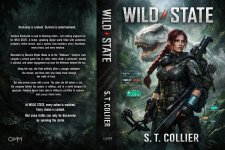
Thank you for the advice, Yakusu. I've found an earlier cover WIP, I'll upload it and see what you and everyone think. Please forgive the Blurb on the back, it's not the current version
 

Attachments

  • WILD STATE Full wrap paperback cover.jpg
    WILD STATE Full wrap paperback cover.jpg
    413.5 KB · Views: 8
Top