
You are using an out of date browser. It may not display this or other websites correctly.
You should upgrade or use an alternative browser.
You should upgrade or use an alternative browser.
I need help... again.
- Thread starter c37
- Start date

TheKillingAlice
Schinken
- Joined
- Aug 12, 2023
- Messages
- 684
- Points
- 133
I'm probably not the best person to ask, I rarely draw, and even less digital. But when I did once draw a person, I used the same method I like using when painting traditionally, which basically means I layer on skintones in darker and lighter shades, sometimes mixing a bit of gray or white into specific tones, but otherwise using the same tone. And then I pile it up and smudge it.
I once posted what happened when I only activated the facial layers of said drawing, basically only the layers that came with the eyes, mouth, nose, and lips.
 But then again, I'm pretty sure I'm not doing what other people are doing, so I don't know if my type of drawing should be taken as advice.
I once posted what happened when I only activated the facial layers of said drawing, basically only the layers that came with the eyes, mouth, nose, and lips.


Lmae
Active member
- Joined
- Feb 12, 2026
- Messages
- 82
- Points
- 33
I would just look at YouTube videos. Traditional media does translate digitally.
 youtube.com
youtube.com
-Drop flat color.
-Put on shadows in another layer. Could be blue or purple shadows.
-Then the highlights on another layer. Those can be orange or yellow.
-Focus on blocking in the light and shadow shapes that follow the planes of the face.
- Use a reference.
- Then Blend.
-Clean up and tighten edges.
- YouTube
Auf YouTube findest du die angesagtesten Videos und Tracks. Außerdem kannst du eigene Inhalte hochladen und mit Freunden oder gleich der ganzen Welt teilen.
youtube.com
- YouTube
Auf YouTube findest du die angesagtesten Videos und Tracks. Außerdem kannst du eigene Inhalte hochladen und mit Freunden oder gleich der ganzen Welt teilen.
youtube.com
-Drop flat color.
-Put on shadows in another layer. Could be blue or purple shadows.
-Then the highlights on another layer. Those can be orange or yellow.
-Focus on blocking in the light and shadow shapes that follow the planes of the face.
- Use a reference.
- Then Blend.
-Clean up and tighten edges.


Little-Moon
Helplessly optimistic
- Joined
- Mar 14, 2021
- Messages
- 155
- Points
- 83
Start with a reference, decide the color of the light, then layer ontop of each other.
For a shadow base blue and purple work best as a neutral shade. Then basically work yourself through the spectrum and the lighter bits you tint the color towards whatever color the light has (natural light is not fully white btw.)
Best start with flats you want to define and then do mid shades.
You should end up with something like this (it is me doing half way realism so and it's tanned skin)
From there on you continue (which is what I am doing there right now) with making transitions softer and give defination to where it matters more.
You can blend or not, that is personal preference. At leats that is how I do it, have been doing fine with that technique the last few years, others may do it differently.
For a shadow base blue and purple work best as a neutral shade. Then basically work yourself through the spectrum and the lighter bits you tint the color towards whatever color the light has (natural light is not fully white btw.)
Best start with flats you want to define and then do mid shades.
You should end up with something like this (it is me doing half way realism so and it's tanned skin)
From there on you continue (which is what I am doing there right now) with making transitions softer and give defination to where it matters more.
You can blend or not, that is personal preference. At leats that is how I do it, have been doing fine with that technique the last few years, others may do it differently.

c37
Well-known member
- Joined
- May 13, 2025
- Messages
- 420
- Points
- 63
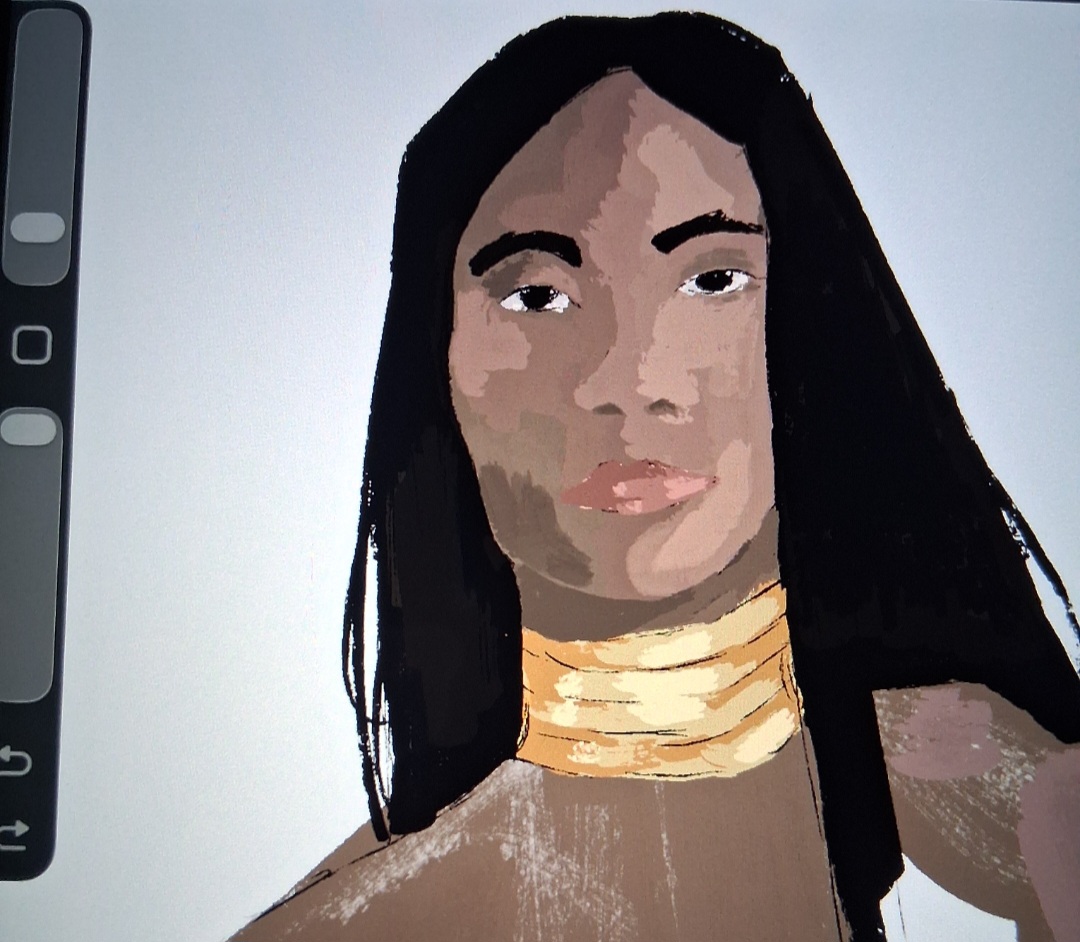
I kept trying, needless to say, I am gonna take a break. I'll resume later.Start with a reference, decide the color of the light, then layer ontop of each other.
For a shadow base blue and purple work best as a neutral shade. Then basically work yourself through the spectrum and the lighter bits you tint the color towards whatever color the light has (natural light is not fully white btw.)
Best start with flats you want to define and then do mid shades.
You should end up with something like this (it is me doing half way realism so and it's tanned skin)
View attachment 48809
From there on you continue (which is what I am doing there right now) with making transitions softer and give defination to where it matters more.
You can blend or not, that is personal preference. At leats that is how I do it, have been doing fine with that technique the last few years, others may do it differently.
Thank you! I'll check it out. I tried to apply what I know but failed.I would just look at YouTube videos. Traditional media does translate digitally.
- YouTube
Auf YouTube findest du die angesagtesten Videos und Tracks. Außerdem kannst du eigene Inhalte hochladen und mit Freunden oder gleich der ganzen Welt teilen.
- YouTube
Auf YouTube findest du die angesagtesten Videos und Tracks. Außerdem kannst du eigene Inhalte hochladen und mit Freunden oder gleich der ganzen Welt teilen.
-Drop flat color.
-Put on shadows in another layer. Could be blue or purple shadows.
-Then the highlights on another layer. Those can be orange or yellow.
-Focus on blocking in the light and shadow shapes that follow the planes of the face.
- Use a reference.
- Then Blend.
-Clean up and tighten edges.
Damn, I wasn't expecting it to be this smudgy.I'm probably not the best person to ask, I rarely draw, and even less digital. But when I did once draw a person, I used the same method I like using when painting traditionally, which basically means I layer on skintones in darker and lighter shades, sometimes mixing a bit of gray or white into specific tones, but otherwise using the same tone. And then I pile it up and smudge it.
I once posted what happened when I only activated the facial layers of said drawing, basically only the layers that came with the eyes, mouth, nose, and lips.
But then again, I'm pretty sure I'm not doing what other people are doing, so I don't know if my type of drawing should be taken as advice.

worldismyne
Member
- Joined
- Dec 13, 2025
- Messages
- 33
- Points
- 18
If it's digital, I'll usually base paint off of a reference.
Then, if I want to change the direction/color of the lighting, I'll throw a few layers over the entire piece on multiply or light opacity. Then you can carve where the light should go with the eraser tool and blend the edges. You can do this with as many layers as you need to get the depth of the shadows right, and can always lighten the individual layers if it gets too dark.
Some drawing programs will have a glow/light option for your layer as well. You can use that to show reflective light on the skin/clothes as needed.
Your piece will look the most cohesive if the highlight/shadows are picked from the background.
Example one shows soft lighting/warm lighting. The shadows aren't as dark and color picked from pillars, because there's a lot of ambient light in the scene. The light hits the hardest on the edge of whatever's facing it.
Example two shows harsh lighting. Green was picked for the main shadow color from the background. The softer light source was painted first, then the shadows, then the lighting from the second/harsher light source was painted on top.
When in doubt, you can always take a picture of yourself with the light source where you want it for the picture.
Then, if I want to change the direction/color of the lighting, I'll throw a few layers over the entire piece on multiply or light opacity. Then you can carve where the light should go with the eraser tool and blend the edges. You can do this with as many layers as you need to get the depth of the shadows right, and can always lighten the individual layers if it gets too dark.
Some drawing programs will have a glow/light option for your layer as well. You can use that to show reflective light on the skin/clothes as needed.
Your piece will look the most cohesive if the highlight/shadows are picked from the background.
Example one shows soft lighting/warm lighting. The shadows aren't as dark and color picked from pillars, because there's a lot of ambient light in the scene. The light hits the hardest on the edge of whatever's facing it.
Example two shows harsh lighting. Green was picked for the main shadow color from the background. The softer light source was painted first, then the shadows, then the lighting from the second/harsher light source was painted on top.
When in doubt, you can always take a picture of yourself with the light source where you want it for the picture.
Attachments
-
 tumblr_85ab76a6668176e2634f0d51eba2a410_4911d021_2048.jpg617.1 KB · Views: 5
 -
 tumblr_560a3adfa7ab2d8927ee5892863714b0_ae94007b_2048.jpg554.7 KB · Views: 5