Introduction 3D Basic Modeling in My Way

yakusu

Well-known member
Joined
Feb 26, 2023
Messages
33
Points
73
Last thread, I shared with you Breaking Down 3D Animation in My Way, from blocking>blocking plus>spline.
Now I want to share with you 3D Basic Modeling in My Way.

The famous meme of learning 3D Modeling will be making a donut, but for me, don't do that!
But do Primitive Modeling.
If you learn 3D Modeling with organic objects first, you won't see the model or object in shape.
You will see a simple object like a cup, a fan, a table, a chair, etc., with heavy thinking like sculpting, high topology, high fidelity, etc. That's the biggest mistake.

So, to learn 3D Modeling first, it isn't actually modeling with Edit Mode or deforming the object, but arranging shapes into an object.
We call it Primitive Modeling, aka Blocking.
In 3D Animation, Blocking is poses. In 3D Modeling, blocking is arranging shapes.
Basically, you play like Lego; each shape you arrange into an object with move, rotation, or scale.
When I taught my students, basically, I was a private tutor for some kids until high school students who wanted to learn and start 3D Modeling. I taught them how to see objects in shapes, like IKEA furniture.
For example, a table: how many shapes can make a table? 5 cubes, if you make the table with 4 legs. A laptop is 2 cubes, a monitor is 4 cubes, a door is 1 cube and 1 sphere, etc.
Screenshot_148.png
Screenshot_147.png

I see some people; this may be a lot, but when they learn 3D and skip this blocking or primitive modeling, they struggle to start modeling. Basically, they don't know where to start. They see an object but can't decide where to start. Do I start from this side or that side?
This happens because they skip primitive modeling, and their eyes can't see shape properly.
For example:
Coffee Machine, how many shapes does a coffee machine consist of?
  • cube → body
  • cylinder → nozzle
  • cylinder → handle
  • cube → base
Basically, shapes are everywhere. If you want to learn drawing, you learn to see shapes.
If you want to learn sculpting clay, you learn to see shape.
It's not just an object; you can make a house with a street by arranging shapes.
Screenshot_149.png

You can make a city with just shapes.
Blocking is actually an essential step in a game studio or an animation studio.
They need to see the structure first, not look first.
Modeling means assembling forms or shapes.

If you really want to learn Blender, you can just start to build a table, chair, or basically any furniture with shapes.
This was a simple PowerPoint of my teaching material for the first meeting, when I taught some kids
First Meeting Material
At the end, I recorded a simple video.
Basically, if you want to start learning modeling, you just need to learn 3 simple things: "Scale, Rotate, and Move." With those, you actually can make anything.

After you can create some objects and be confident about those 3 simple things, you can continue to the next step, which is focusing on edit mode.
In the next step, you recreate what you just created in primitive modeling, but in Edit mode, basically, you will start to learn how to deconstruct a cube into vertices, edges, and faces to make an object, so you just need one cube to make one object. Slowly, you will learn about deformation and topology.
 

ManwX

Im from a Timeline where nuclear war destroyed all
Joined
Mar 12, 2022
Messages
473
Points
103
noice.. good advice to learn basics first. peopl jump into polygon count, modifiers, whatnot too early. It's better to know fundamentals first.
 

Emotica

Member
Joined
Jan 21, 2026
Messages
85
Points
18
I mean this entirely respectfully, and with sincere curiosity: Doesn't A.I make this obsolete? Like a table is a table right? I swear I've seen A.I tools that can turn a 2D image into a 3D one, and it wouldn't surprise me if you could just scan a real object into a 3D environment. Didn't real estate kind of figure that out pre-A.I? I thought that's how they made the interior tours. I also seem to also recall some games experimenting with similar technology pre-A.I too.

Again, I mean this all respectfully. I'm guessing there's a specific reason that this would still be very useful. I imagine there's a lot of times where you need a specific result, I'm just not sure I understand it for generic objects. You can make a city with shapes yes, but if there's nothing super distinct about the city, I'd think it'd take a very long time to do manually, and a very short period of time with artificial intelligence, even if you drew it first.

I'm only asking because I was researching 3D modeling last week, and I was surprised how much A.I seemed to be the default. I didn't really have much time to think about it at the time.
 

yakusu

Well-known member
Joined
Feb 26, 2023
Messages
33
Points
73
I mean this entirely respectfully, and with sincere curiosity: Doesn't A.I make this obsolete? Like a table is a table right? I swear I've seen A.I tools that can turn a 2D image into a 3D one, and it wouldn't surprise me if you could just scan a real object into a 3D environment. Didn't real estate kind of figure that out pre-A.I? I thought that's how they made the interior tours. I also seem to also recall some games experimenting with similar technology pre-A.I too.

Again, I mean this all respectfully. I'm guessing there's a specific reason that this would still be very useful. I imagine there's a lot of times where you need a specific result, I'm just not sure I understand it for generic objects. You can make a city with shapes yes, but if there's nothing super distinct about the city, I'd think it'd take a very long time to do manually, and a very short period of time with artificial intelligence, even if you drew it first.

I'm only asking because I was researching 3D modeling last week, and I was surprised how much A.I seemed to be the default. I didn't really have much time to think about it at the time.
Topology is the main difference between AI and Human. You surely can generate it with AI, but the topology will be a mess.
Mostly, they have a lot of vertices and faces, like thousands, whereas a table is just a simple object; surely it's under 100 or even less.
For example, if you generate a table with AI, you have a lot of vertices and faces; however, if you create your own table, you only have simple faces and vertices.
3D-generated AI is usually for 3d printing, because 3D printing usually doesn't give a shit about topology.
You can't give a rig to an AI-generated human model.
You can't give an image texture to an AI-generated table model.
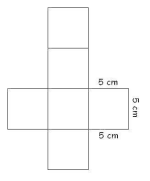
Because of the topology. In elementary school, you must be learning about making a cube with cut-out paper, like this
1773640148155.png

Without your knowing, you actually learned about cube topology and UV unwrapping for texture.
1773640255575.png

Topology and UV unwrapping need a human hand.
An example of AI model and bad uv
1773640503953.png

That side of the house doesn't need 4 faces but 2 faces.
Look at the cube above; imagine one side of the cube like that house side, you have two diagonals/some diagonal line.
1773643489557.png


The more faces you have, the more performance you need. Optimization is the key.
An example, Project Neo from Adobe.
It's 3D, but it's not 3D traditionally; it's vector 3D, you can't export your result into 3d file like OBJ, FBX, etc, because it's fake 3D, they used only for commercial purposes, like posters or social media posting.
In the real estate industry, they just need to find a render artist, not a modeler, because the real estate industry isn't like an animation or game studio; they use SketchUp, which is more precise and efficient for architects or civil engineers. The model or the building is made by the Architect, civil engineer, or drafter, and the rendering is made by the rendering artist.

City Blocking is an important step, for example, from ArtStation.
1773639787107.jpeg

The purpose of city blocking is to establish the foundational layout, scale, and spatial relationships of the environment using simple objects. It's not about the look; it's about the layout. Most importantly, you will see an object in shape.
Believe it or not, every time I see a unique house or some unique object in the street, my brain will immediately dissect it. "That building starts with this shape on this side; after that, I go to that side, etc."
Understanding the flow of modeling in shape will result in great topology.

You can use AI for 3D printing stuff and some fun stuff, but you can't use AI if you actually want to learn the behind-the-scenes of the industry: Topology and UV. I think those two things are what AI can't create properly.

Big example
1773641148641.png
1773641304330.png

If an AI-generated model, they usually generate like the Garten of Banban model. That drone is actually a massacre; it's not an organic shape. Why is it so high-poly? You can start with 4 cylinders, 1 sphere, and 8 cubes.
I spent a little bit of my time to do this
1773642066805.png

The left is the model from Garten of Banban, and AI usually generates like that. On the right is what I tried to recreate using a simple deformation.

Primitive Modeling isn't about looks; it's about you learning to see shapes and geometry. Like in the post, I met some people who are struggling to start modeling because they don't know where to start.
A steam train is actually a great way to see the shape.
1773642559018.png

If you can already see the shape, you don't need to build the train with primitive modeling; you can just go into the next step, but if you can't see the shape or still struggle with where to start, then you need to go back to primitive modeling.
AI understands surface appearance, but it fundamentally lacks the logic of construction and purpose.
Primitive modeling is about learning the logic of construction and purpose.
 

Attachments

  • 1773640123570.png
    1773640123570.png
    11.1 KB · Views: 4

Emotica

Member
Joined
Jan 21, 2026
Messages
85
Points
18
Topology is the main difference between AI and Human. You surely can generate it with AI, but the topology will be a mess.
Wow. I'm gonna have to read your entire post two or three time to really understand. I understood some if it based on my research last week, but this is most certainly the most I've learned about 3D Modeling, period. I guess the part that's not clicking for me at all yet is with something like that Garten model, that's all just... shapes? Obviously it is, I just don't see it at all. I can kind of follow how you'd make the drone or train, but when it comes to 3D character models, are you just "pulling" at the shape and freezing it until it sticks? I understood (I think) the part about A.I only really understanding the surface, but in the case of character modeling, I don't see how A.I wouldn't suffice? Like on a typical character, would clothes and hair be their own independent objects? How do you get from a static and moveable/rigged character to the actual physics of it.

By the way, don't feel obligated to do homework for me. I'll research it regardless, but if you like sharing, then you're very good at explaining these things. You're very talented. I was researching 3D modeling because I figured it would be a good pathway to creating reusable environments.
 

yakusu

Well-known member
Joined
Feb 26, 2023
Messages
33
Points
73
when it comes to 3D character models, are you just "pulling" at the shape and freezing it until it sticks?
No, if you think of it like that, your character can't be moving, because human topology is focusing on human muscles; they need to deform, if you just put topology like you model an object, the character's deformation will be so limited.
Character topology has some levels, depending on the character's needs.
1773656068716.png

The first one from the left is a realistic topology, basically like the human body's facial muscles, for example, Spider-Verse, Genshin, etc.
This is amazing example of timelapse modeling
https://www.sergicaballer.com/3d-facial-modeling-timelapse/
The second one is a deformed topology or stylized topology, basically like Disney character topology. Because their faces need to deform so much, maybe their mouth can open more widely than a realistic human's.
The third one is silhouette topology; the focus of this topology is the texture. Usually, it's for anime styles like Bang Dream, VR chat, Guilty Gear, etc. The problem with this topology, in my experience, is the rigging. Basically, this face is hard to rig; you can just use shape keys, not bones.
1773656463807.png

This is a slideshow from the Guilty Gear official, showing how they dissect their own model, but in Japanese
Slideshow
The last one is like symbol topology or image topology; basically, the eyes, mouth, or some other face parts aren't integrated into the face, or as different object. Usually, it is used for cartoon styles, where their eyes and mouth have an outline.
For example,

The body is also the same.
You can check Shonzo's YouTube Channel
However, Shonzo isn't for beginner modelers, but he showcases an amazing workflow and topology.
If you want to learn the anime style, Natsumori is good; he showcases it for beginners.

If you want to know how gacha games are modeled, 2 AM is also good for reverse engineering.

Basically, if you want to model a character or animal, you follow the flow of deformation and the references, usually the muscles.
Look at the knee of the leg.
1773657418085.png

If it's for animation, that tris will be gone, but it's still the same application.

Look at a piece of paper; if you fold a piece of paper, the paper can bend.
1773657614608.png

But if you fold a simple plane in a blender, you can't bend it like that.
1773658138657.png

You see the difference above: when there is only one loop in the middle, the plane is perfectly 90 degrees, but when I add some loops, the plane becomes more organic, that's a simple deformation of topology.

So human's character topology needs human to do it, because AI only focus on surface, like objects; they don't know this side needs to deform like this and etc.
1773658384847.png

That's AI topology, the problem is at the deformation section because that model doesn't have the base model behind those clothes, so when the hand moves, the entire body will follow it, or the hand, when the hand rotates, the entire arm follows it.
1773658564919.png

The flow, in cyan color, is for separating the deformation between the body and the arm, so when the arm moves, the body is still.
1773658772750.png

The flow, in blue color, is for separating the deformation between the hand and the arm. The green flows are for the finger moving, the red flow is the finger cap, like knee cap.
Basically, understanding human topology in 3d is like understanding human anatomy and human muscles.
Clean topology doesn't mean a good topology in the human body. Good topology is good deformation in the human body.
My friend had a client for the human body, but he didn't retopology it; he used quad remesh, basically, a generated topology. It was a clean topology, but it was not a deformation topology, so his client was so angry and never used my friend again.

For 3d Printing surely good, you can use AI. But for character animation and games, you can't use AI because this topology.
This's also good for references behind the scene
 
Last edited:

Emotica

Member
Joined
Jan 21, 2026
Messages
85
Points
18
How long did it take you to learn all of this? You're actually explaining so much of this in a digestible way. I have to circle back to the YouTube videos, but I think I understood your explanation. I was mostly interested in the anime style. If I'm understanding correctly, wouldn't silhouette topology actually suffice if "all you need" is facial expressions?

Just to wrap up my initial question, I think you sufficiently answered why A.I isn't a replacement yet. I'd assume that even if it could do it all, that there would already be templates? Like, everyone's not doing this from scratch, right? I'd think for common objects you'd just use an asset library, and that customization is where you get into all of this deeper stuff? Like, how much effort is going into a VTuber vs a Pixar character, vs a videogame?
 

yakusu

Well-known member
Joined
Feb 26, 2023
Messages
33
Points
73
How long did it take you to learn all of this? You're actually explaining so much of this in a digestible way. I have to circle back to the YouTube videos, but I think I understood your explanation. I was mostly interested in the anime style. If I'm understanding correctly, wouldn't silhouette topology actually suffice if "all you need" is facial expressions?

Just to wrap up my initial question, I think you sufficiently answered why A.I isn't a replacement yet. I'd assume that even if it could do it all, that there would already be templates? Like, everyone's not doing this from scratch, right? I'd think for common objects you'd just use an asset library, and that customization is where you get into all of this deeper stuff? Like, how much effort is going into a VTuber vs a Pixar character, vs a videogame?​
First question, wouldn't silhouette topology actually suffice if "all you need" is facial expressions?
Suffice yes, but all you need is depends.
Silhouette topology only focuses on the silhouette. The cheek loops and the jaw loops are limited; look at the cheekbones between the stylized/deformed topology and the silhouette topology, and the area around the mouth. In stylized, they are usually round and the lines are contour; it's because they need to stretch. If the line is flat, not a contour-like stylized one, the mouth can't stretch a lot.
1773715217951.png
1773715228888.png

Silhouette topology usually doesn't have eyeballs to maintain the flat silhouette of white eyeballs. If you put, like, Rigify for auto-rig in Blender, the face rig is difficult to put in. They usually use shape keys. Shape keys are a pose animation that uses deformation of the body, not the rig/bones. Basically, the modeler needs to make a deformation or edit the model manually, like closing the eyes, smiling, being angry, etc., because the topology isn't sufficient for the rig.
For example, this is the model from Wuthering Waves when imported and modified in Blender.
Screenshot_156.png

As you can see, there aren't any bones on her face, but there is an expression controller; it's the shape keys. The con of this way is that the expression is static because it's a premade expression.
1773716515242.png

My friend modeled that, but I rigged it because it's stylized, and the topology is deforming so much. I can put the bones without destroying the face. With these bones, the animator can move the eyebrows, the eyes, and the mouth freely. If you put a face rig on the silhouette topology, mostly the silhouette will be a mess; the dent will immediately be seen. That's why silhouette topology relies on the modeler to make the expression, not the rigging artist.

The pros of shape keys are their premade expressions, so if there is a lip sync, the animator can just adjust the slider to "A" or "O." The cons of shape keys are that they are static; basically, every word or expression will be the same because it's premade by the modeler.
The pros of face rig are natural; basically, the one who controls the expression is the animator. The animator can make the mouth wide open differently or say "A" differently, based on their style. The cons of face rigs are different efficiencies. In shape keys, you have everything available, and it makes it more efficient. In face rigging, you make the expression from scratch for each pose.

For games, the shape keys are the way because they are more efficient, and games don't need much expression, and they need to detect pre-made expressions.
For animation, the face rig is the way because animation needs much expression and to be more natural.

Sometimes, you can go in the middle for animation, like in the example of my rig; the eyes of that character don't have bones, but it uses shape keys. It happened because we faced a tight deadline, and I struggled with the eyelashes. So, we met in the middle; the eyes for closing and opening are using shape keys.

Second, question if AI could do it all; that is, would there already be templates?
It depends; Topology has a different style; it depends on how the modeler sees it. Even though the fundamentals are the same, the modeler sometimes approaches it differently. It makes each artist have a different topology workflow and results. If AI actually could figure it out, I think they would figure out the realistic topology as the orthodox topology, and when the model is stylized or anime, they still can't figure it out. So the templates for AI, I think, in the future will be realistic topology, but they can't be implemented in stylized or anime because of different topology and deformation.

Third question: Does everyone do it from scratch?
Yes, if you start learning topology, you start with a single plane. Basically, you start with one rectangle among those many rectangles and create a human body or face.
Usually, the industry workflow will be like this.
If the character is stylized and high-fidelity, usually the sculpting artist makes the character first. The results of sculpting are usually like the Garten of Banban model; they aren't optimized and are a mess in topology. After that, the modeler retopologizes it; basically, the job is to cover the sculpting result with a plane or rectangle, but follow the flow of topology and deformation.
1773717905831.png

If the modeler doesn't need the sculpting and can make the model just based on the character sheet. They can approach differently.
This artist starts using verts like dots/vertices, not planes.

This artist starts using blocking, a sphere-shaped object.

This artist starts using planes but starts with the eyes.

Usually, for learning or a beginner, the best way to start modeling a face is in the area between the eyes.
Check the Natsumori Katsu video

So they are making it from scratch.

Final question: How much effort is going into a VTuber vs a Pixar character, vs a videogame?
It depends on the complexity of the character movement.
If the character movement isn't complex, like a human being or real-life movement, the topology will be a realistic one; VTubers or VR Chat use this for the body, but the face uses silhouette topology. Shonzo Channel is great because he has so much experience with the Vtuber models, yet the video isn't for beginners. You can still see the result of the topology.
I don't know much about the facial VTuber, but I see a lot of models of VTubers using shape keys, not face rigs. It can be because of the facial tracker detection, like a smile; there must be a premade smile expression so when the user smiles, it detects it.
Pixar characters have deforming movement; they move like rubber with amazing stretch, so a realistic topology would be so stiff. You can't use premade expressions because their expressions are so natural and stretchy, so they need face rigs, and they make the animator have full control of the expression.
1773719060012.png

So they used the stylized or deformed topology.
It's not from Pixar, but it's a good reference for how deformed topology is challenging to achieve.

For a video game, they don't need a topology like Pixar's or stylized; they usually have the same topology as Vtubers or VR Chat. They used realistic topology for AAA-type games, but for games like Genshin, Wuthering Waves, Arknights, etc., they used silhouette topology.

The biggest difference between video games and animation is in topology. In video games, they focus on efficiency and optimization, so Pixar's topology or stylized topology isn't efficient and optimized because those topologies need more performance. In animation, they heavily focus on "look."

I'm heavily focusing on animation and rigging, not on modeling, but on fundamental modeling, I understand it well. In the 3D industry, there are various departments: modeling, rigging, animation, and rendering.
Modeling focuses on sculpting, character, environment, and props.
Rigging focuses on rigging, or putting bones to the character or props.
Animation focuses on animation blocking until the spline.
Rendering focuses on lighting, set dressing, and rendering.
Almost forgot, I've been using Blender for like 4-5 years. However, my main focus is animation, so for those years, I have mostly focused on animation and still fundamental modeling and topology; I need to grab it.
I can go in 2D too, but in 2D, I can only focus on the in-between, clean-up, and coloring. Key poses—I am struggling with that. However, I know the fundamentals and the behind-the-scenes of the 2D animation industry.
Basically, I learn and study each side of animation.
I know the behind-the-scenes of stop-motion animation and have experience making a short stop-motion animation. I know the struggle of how to animate a puppet, which makes my back so sore, because each day I need to animate for 6-8 hours for just 2-4 seconds of footage.
3D and 2D are the same; I have experience in the retrospective field in animation projects.

However, I feel more comfortable and enjoy sharing what I know, so I taught some kids about 3D and other things they want to know.​
 
Last edited:

Emotica

Member
Joined
Jan 21, 2026
Messages
85
Points
18
Thanks for the detailed responses. I've got my homework now. You're really good at breaking down these concepts. There's a lot I still don't understand, but I think that's more from information overload. I'll have to retrack my steps a few times, but your explanations already gave a pretty good foundation on where to research more. You should consider making a blog or a YouTube channel. It's a talent being able to convey something so complex to someone that knows far less than you.

I think I'll mess around some more with some online tools now that I understand a bit more. Seems like if you try to take a shortcut, that you're missing a whole lot. That sketch to 3D video is the kind of workflow I'd want to master. Seems like online and A.I tools are able to replicate the most rudimentary version of that, which is cool just to mess around with, but the level of actual detail is lacking. Things like fingers, hair, clothes, and editing seem to still be a challenge, as well as the multiple angles. I think you answered my initial question perfectly though. A company would have to be super incentivized to create and sell an A.I that would largely appeal to people that already know what they're doing.

That being said, I'm definitely missing some key points, but I can 100% the effort and value here. I'm gonna use this thread as a research reference, Thank you so much for your responses! I don't want to pester you with more questions, because I think my only questions are just from not being able to absorb everything at once.
 
Top