What app/program do you use for outlining your plots?

OniKaniki

Member
Joined
Aug 15, 2025
Messages
62
Points
18
So, I'm a new writer. After writing around 20 chapters or so, I have realized that keeping things in my head is a serious problem, especially since my work has a mystery tag. Of course I can still remember most things, but I would imagine that after finishing my Vol. 1, I would forget everything.

The way I'm outlining is now just writing a bunch of ideas in one note, gg doc, but managing them is a pain, and sometimes I would forget about a character's appearance and have to read back in my chapter to write again.

So I want to ask everyone, authors and writers here, what outlining app are you using?

Are there any free outlining programs/apps that can sync across multiple devices (it's fine if it's just two; I only need two, for phone and for desktop)?
 

empalgepuk

Active member
Joined
Sep 3, 2025
Messages
139
Points
43
Various plain ASCII text editors. Mousepad on my XFCE desktop does the job enough. On phone, I still use google keep.
 

Eldoria

Well-known member
Joined
Jun 14, 2025
Messages
1,576
Points
113
You should save your character designs in the SH glossary. Character designs include background, appearance, personality, ideology, powers, and relationships between characters. I do this in my novels, especially for important characters who I'll continue to play throughout each arc. For minor characters, I usually consider their roles to end once the arc has ended.

Another option, you can use fandom to store information on characters, timelines, arcs, worldbuilding, and even small details like lore and artifacts.
 

MajorKerina

Well-known member
Joined
May 2, 2020
Messages
465
Points
103
I just shove a bunch of words about what I wanna do later in the story at the end of whatever I'm writing and then copy it over later if there's still stuff that's important.
 

ConansWitchBaby

Da Scalie Whisperer
Joined
Dec 23, 2020
Messages
1,688
Points
153
From the quick search I looked online, all of them are basically just what programmers use to organize their shit. A nice tree-view with the ability to drag-and-drop sections. You can do that with Word (I assume you have it like everyone tends to and if not: get an official iso link from the microsoft forums and look up massgravedev and follow the instructions) and cleverly using the headings and navigation features. If you want fancier uses like digital index cards, use just about any note taking app really.
 

blackcrowcrowd

Well-known member
Joined
Aug 23, 2022
Messages
164
Points
83
Previously I did it on obsidian but I tend to get bored really quick, making a LOT of story ideas but not executing them. Then I switched to just making draft chapters directly on SH and it's going pretty well not gonna lie
 

Hads

Member
Joined
Oct 16, 2025
Messages
36
Points
8
I'm using Google Docs for the general outline, I use obsidian to keep track of the characters and places. My book is likely to end up with 100s of characters, so I needed something to keep them at least a little consistent.
 

FRWriter

Well-known member
Joined
Oct 3, 2024
Messages
527
Points
108
I use Google Docs for a few notes. However, I usually slack off and do not take enough of them, and then have to reread older chapters constantly.
 

esfirS

New member
Joined
Oct 19, 2025
Messages
10
Points
3
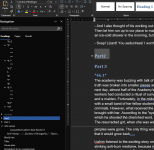
I use MS Word's navigation feature ? I organize all my additions, thoughts, and supporting information into chapters and create subchapters. For example, if I create a new character named Liara, I copy the name into the 'Info Names' chapter (marked as Heading 1), then mark 'Liara' as Heading 2, and her description as Heading 3. I do the same with ideas.
 

Attachments

  • 1761138428858.png
    1761138428858.png
    90 KB · Views: 13

CharlesEBrown

Well-known member
Joined
Jul 23, 2024
Messages
4,565
Points
158
It is an old program, yet one that has yet to develop a stable build so is still in Beta Testing mode. It is called "My Brain"
 
Top