

NovaExxi
Active member
- Joined
- Jun 22, 2020
- Messages
- 16
- Points
- 43
For my dear phone readers or whoever want something to remind them "this story has a new chappy", here's a step by step!
- Download Read You from F-droid. This is an RSS reader
- Go to your favourite reading list and tap on the little cog (
 ) icon
 - Find the blue RSS symbol under Local {list name} settings
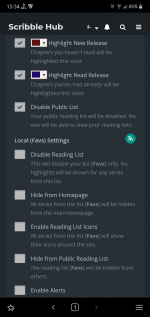
- Copy the url from the you are thrown into, don't mind the wall text, that is the RSS feed.
- Open Read You
- Tap the plus icon on the top right, paste the url into the field
- "Allow notifications" under the Preset area and save.